WhatsApp group links make it easy to invite people to join your group without adding each member manually. Whether you’re managing a family group, study group, office team, or community, sharing a group invite link is the quickest way to grow your group. Here we are going to guide you step by step How to Share a WhatsApp Group Link.
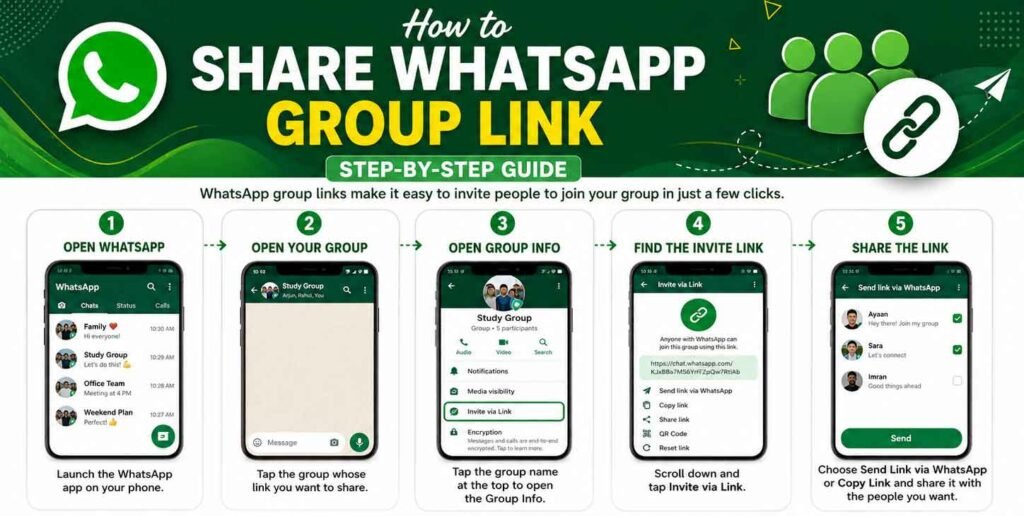
In this guide, you’ll learn how to create and share a WhatsApp group link in just a few simple steps.
What Is a WhatsApp Group Link?
A WhatsApp group link is a unique invitation link that allows anyone with the link to join your WhatsApp group. Only group admins can create, reset, or revoke an invite link.
You May Like
How to Share a WhatsApp Group Link
Step 1: Open WhatsApp
Launch the WhatsApp app on your Android or iPhone.

Step 2: Open Your Group
Tap the group whose invite link you want to share.
Step 3: Open Group Info
Tap the group name at the top of the chat to open the Group Info page.
Step 4: Find the Invite Link
Scroll down and tap Invite via Link (or Invite to Group via Link, depending on your WhatsApp version).
Step 5: Share the Link
You’ll see several options:
- Send Link via WhatsApp
- Copy Link
- Share Link
- QR Code (available on some versions)
- Reset Link (creates a new invite link and disables the old one)
Choose the option that works best for you and send the link to the people you want to invite.
How to Copy a WhatsApp Group Link
- Open the group.
- Tap the group name.
- Select Invite via Link.
- Tap Copy Link.
- Paste the link anywhere you want, such as an email, social media post, or messaging app.
Who Can Share a WhatsApp Group Link?
Only group admins can generate and manage invite links. If you’re not an admin, ask the group administrator to share the invite link with you.
Tips for Sharing Group Links Safely
- Share your group link only with people you trust.
- Avoid posting private group links on public websites or social media.
- If unwanted people join, use Reset Link to create a new invite link.
- Remove inactive or spam members regularly to keep your group secure.
Frequently Asked Questions
Can anyone create a WhatsApp group link?
No. Only group admins can create and manage invite links.
Can I disable an old invite link?
Yes. Simply select Reset Link to generate a new link. The old link will stop working.
Is there a limit to how many people can join?
The number of members depends on WhatsApp’s current group member limit.
Conclusion
Sharing a WhatsApp group link is a fast and convenient way to invite new members. Simply open your group, go to Group Info, tap Invite via Link, and share the link using your preferred method. Remember to share your invite link responsibly and reset it if it ever becomes public or is misused.
Excellent beat ! I would like to apprentice while you amend your site, how
can i subscribe for a blog site? The account aided me a acceptable deal.
I had been tiny bit acquainted of this your broadcast provided bright
clear idea